Why is the Destination URL field locked?

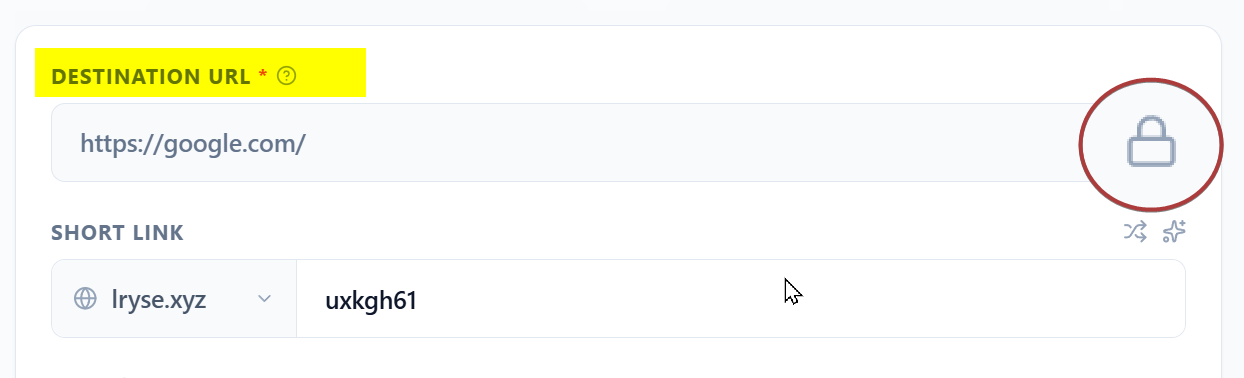
If you are trying to edit an existing link and find that the Destination URL field is grayed out with a Lock Icon inside it, this article explains why this happens and how to resolve it.
What does the lock icon mean?
The lock icon indicates that the editing window for this specific link has expired. You can no longer change where this short link points to, although the link itself will continue to work normally.
The 30-Minute Security Window
On the Starter (Free) plan, we enforce a strict security policy regarding link edits:
You can only edit the Destination URL within the first 30 minutes of creating the link.
This window is designed to let you fix immediate typos (e.g., pasting the wrong URL) while preventing long-term changes to the link’s behavior.
Why do we have this rule?
This restriction exists to protect the reputation of the Linkryse platform and, by extension, your links.
Malicious actors often use a technique called “Bait and Switch”:
- They create a link pointing to a safe site (like Google or CNN).
- They post it on social media and wait for it to be scanned and approved.
- Days later, they switch the destination to a phishing or malware site.
By locking the destination after 30 minutes on anonymous/free accounts, we prevent this behavior. This ensures that social media platforms (like Facebook, X, and LinkedIn) continue to trust Linkryse links, keeping your delivery rates high.
What can I still edit?
This lock only applies to the Destination URL. You can still edit all other aspects of your link at any time, including:
- Link Title
- Tags
- Notes / Comments
- Folder Organization
How to unlock editing
If you need to change the destination of an older link (for example, updating a monthly promotion or correcting an old resource), you can unlock this feature by upgrading.
Pro and Business plans include Identity Verification via payment, which allows us to trust you with unlimited, lifetime editing capabilities.
Was this article helpful?